


FAQs

Lalamove is an on-demand delivery app that matches drivers to customers. Driver partners get to choose to take as many or as few orders as they want at any time of the day!
Once you submit your documents and complete the background check, the review process usually takes a few business days. You will receive a push notification and an email as soon as your account is activated.
Cash-outs are processed automatically every week. As long as you have set up your bank details and have a balance of at least $15 by Tuesday night, the funds will be deposited into your bank account that Friday.
1. Download the Lalamove Driver app
Open the app, tap ‘Register’, and follow the steps to complete the online orientation.
2. Prepare and upload your documents
Make sure you have the following ready:
A valid U.S. driver’s license
Auto insurance that meets your state’s requirements for vehicle registration*
3. Complete the background check
Once your documents are submitted, you’ll receive an email invitation to start your background check.
Follow the link to submit the required information
You'll receive a notification once your background check is complete
That’s it! Once all steps are completed and approved, you’ll be ready to start delivering soon!
* Make sure your auto insurance policy meets the minimum requirements and covers your vehicle's use for paid delivery services, as outlined in our Terms and Conditions.
Any applicant aged below 18 are NOT eligible to be a driver partner.
You can reach customer service every day from 9am to 6pm EST.
Open the app, tap the side navigation, and select "Help Center" to begin talking with customer service.
Reasons why you didn't receive your cash-out may include:
-
Incorrect Bank Details: There may be a typo in your routing number or account number.
-
Insufficient Wallet Balance: You must have at least a $15 wallet balance.
-
Account Review/Hold: Your driver account may be under a temporary review due to a safety, customer service, or fraudulent activity flag.
Lalamove Missions are special tasks or challenges that allow drivers to earn extra rewards or bonuses. To know more visit https://www.lalamove.us/en-us/blog/your-guide-to-driver-missions-lalamove-usa
You can earn extra money by installing our Lalamove branded stickers on your car or van.
Step 1: Go to your Lalamove Driver App.
Step 2: Tap on Profile.
Step 3: Tap on Sticker program.
Step 4: Tap on Schedule Installation and choose a day and time for you to come to one of our locations to have our non-permanent stickers professionally installed. We'll reach out with more details once you reserve a slot.
Send an email to info@lalamove.us if you still haven't received your payment.
You can earn extra money by inviting your friends to join Lalamove as drivers or users.
Step 1: Go to your Lalamove Driver App menu.
Step 2: Tap on Refer a Friend or Driver Referral.
Step 3: Copy your unique Referral Code or Link.
Step 4: Share it with your friends. When they sign up using your link/code and complete a specific number of deliveries, you both get a bonus!
You contact the user or recipient by clicking the phone icon. After clicking the icon, the user will be called. You can also talk to the sender via chat in the app.
Try contacting the recipient directly via the in-app chat or call features. If they remain unreachable after several attempts, you can also try to contact the sender. If there is still no response, contact Lalamove's customer service team via the app before proceeding to deliver the items according to the client's instructions or the specific notes on the booking (e.g., leave the items with the front desk or at the apartment door, if in a secured building).
If you are picking up an item and the sender is unresponsive, reach out to Lalamove's customer service team via the app.
If you need to edit your order, please contact our Customer Service Team as soon as possible for assistance.
To cancel an order, please contact our Customer Service Team and provide the reason for your cancellation.
The following vehicle types are available to join Lalamove
-
e-bikes
-
Bicycles
-
Sedans
-
SUVs
-
Cargo vans
-
Sprinter vans
You cannot open more than one account in Lalamove with different vehicles. Delivery Partners can only open one account, and each account can only register with one vehicle.
No, the same vehicle plate or vehicle can only apply for one Lalamove account.
For update of Vehicle details, do head to your Driver App > Profile > Settings > View Personal Info > Vehicle Details
-
New York City: Only e-bikes (class 1-3) and non-powered bicycles qualify. For more information on what qualifies as an e-bike, visit NYC DOT's Electric Bicycles & More page.
- New Jersey: We accept Low-Speed Electric Bicycles and Motorized Bicycle/Moped. For more information on bike classifications, please visit NJMVC New E-bike Requirements.
It is your responsibility to follow all local regulations for your vehicle type.
Eligibility depends on your delivery zone:
- New York City: Mopeds, motorcycles, and standing motor scooters do not qualify for bike deliveries.
- New Jersey: E-bikes and qualifying mopeds (gas/electric with operable pedals, under 50cc / 28 mph) are accepted. Standard motorcycles, e-trike, heavy motorbikes, and standing e-scooters do not qualify. See NJMVC Motor Vehicle Advisory.
Yes, but you must first update your vehicle type in the Driver app settings to ensure that you are only assigned orders that fit your current vehicle’s capacity. Vehicles can not be changed more than once per month.
Mandatory gear includes:
-
Helmet: New York City and New Jersey require working bikers to wear helmets while they deliver.
-
Insulated delivery bag (hot/cold): If you accept food orders, an insulated delivery bag is required. The bag must be large enough to accommodate items for multi-stop delivery orders and fit on the rear rack or in a cargo pannier.
-
Reflective vest: Required in New York City and recommended in New Jersey. Local laws may vary. Please verify regulations in your specific delivery municipality.
-
Headlight, taillight, and wheel reflectors: These three items are a must for accepting night-time deliveries.
-
A bike bell: Announce your presence to cars, pedestrians, and other bikers by ringing a bike bell.
Need gear? Contact info@lalamove.us to request helmets, insulated bags, reflective vests, lights, or bells.
Other gear we recommend includes:
-
Phone mount: Handlebar-mounted for hands-free navigation; ideally, a vibration-dampening model.
-
Heavy-duty lock: A U-lock and a secondary cable for wheel security during drop-offs.
-
Portable charger (power bank): Keep your phone charged during deliveries.
-
New York City: Refer to safe e-bike usage tips on New York City Gov's Electric Bicycles & More page.
- New Jersey: Refer to your local municipality's e-bike safety guidelines and NJMVC E-bike & Moped Manual.
The Lalamove app generally filters these orders, but use your best judgment. Always consider the weight and size of the delivery item before accepting orders.
Immediately contact Lalamove support's team in the Lalamove Driver App if you accept an order and realize you cannot deliver it because the item is too large or heavy.
Lalamove requires drivers to provide:
-
Full Name
-
Date of birth
-
Email addresss
-
US Driver License (not a learner's permit)
-
Vehicle photo
In addition, all drivers must ensure they meet all requirements to legally operate their specific vehicle type (e.g., Auto insurance, vehicle registration)
No, you do not need vehicle registration or insurance as long as you are using a bicycle or e-bike.
No, however, a state-issued ID is required.
Orientation is conducted asynchronously through the Lalamove Driver app, and in biweekly live virtual sessions. Check your email inbox for an invite to the next live virtual orientation session.
We offer the most competitive rates in the industry. You keep 99% of the delivery fee paid by the customer. This is subject to change.
Remember to enter the correct bank information in the Lalamove Driver App. We will process your cash out on a weekly basis after your successful completion of delivery.
Valid Proof
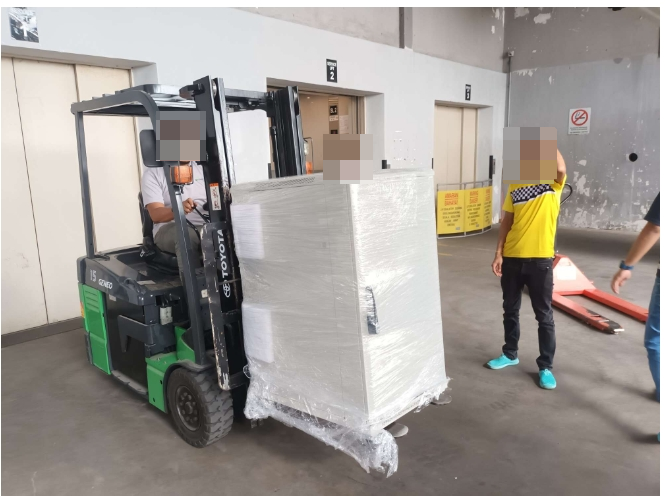
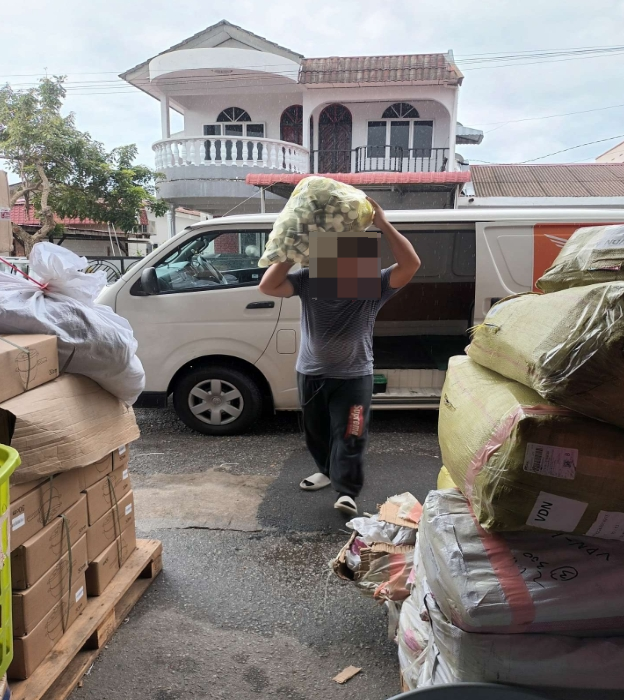
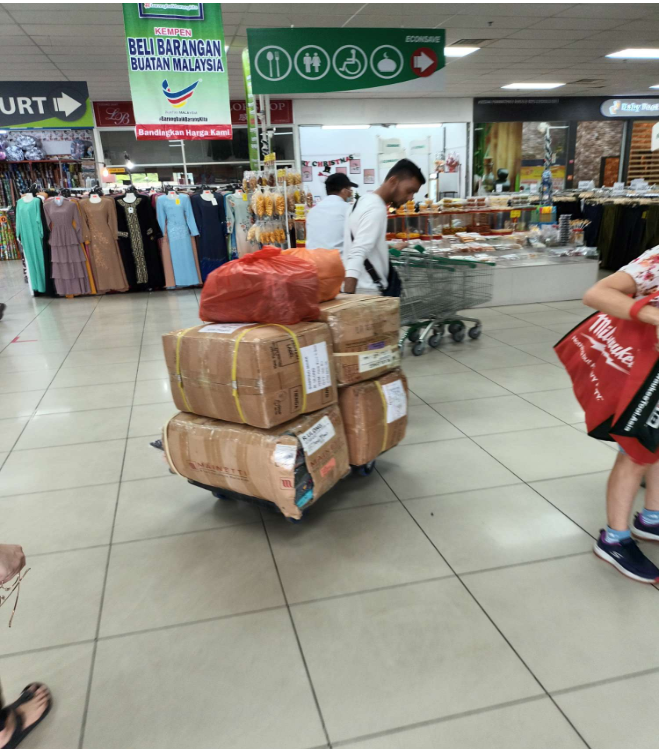
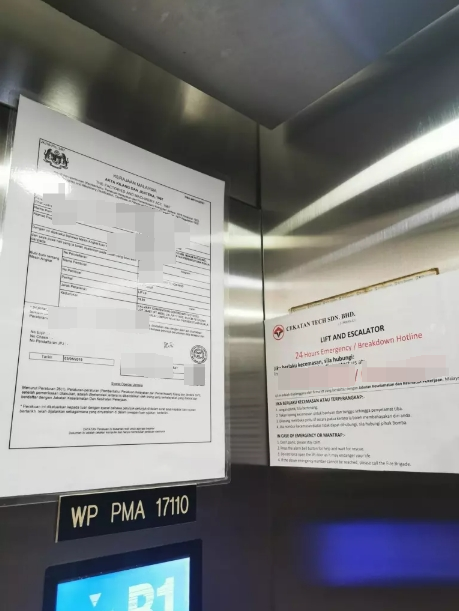
To be considered as a valid Proof of Delivery, we recommend capturing a clear and helpful photo that shows:
- Clear picture of delivered item (s) in a well lit area, during the unloading process
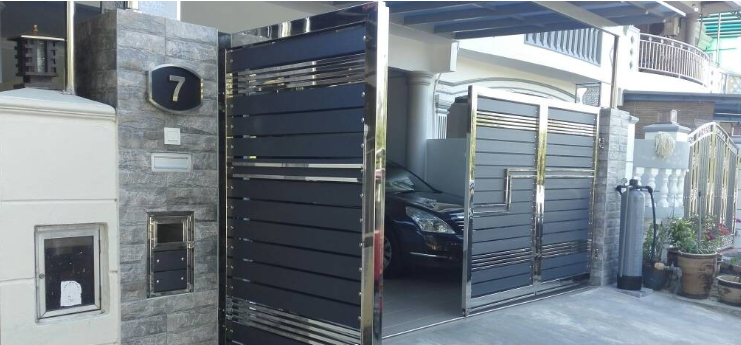
- Clear picture of the customer’s drop-off location:
- House number; if not available, then
- Lift document with address; if not available, then
- Customer door (residential) or company logo (non-residential)
Invalid Proof
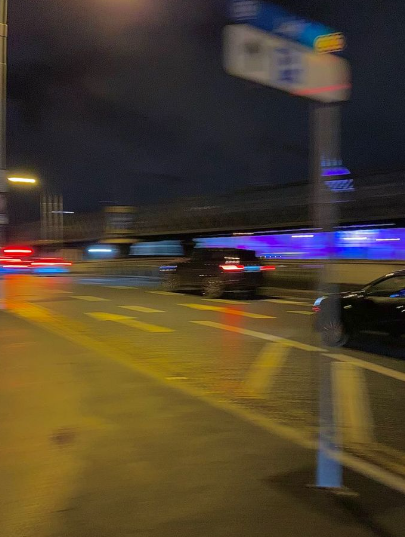
To avoid confusion or delivery issues, try not to upload:
- Blurry pictures of location
Example:
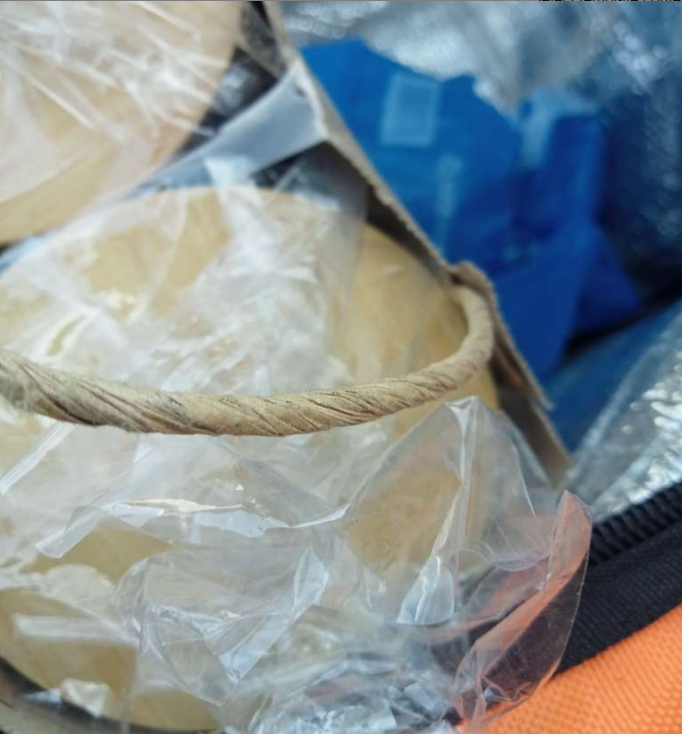
- Zoomed in / Unclear Picture of delivered item
Example:
- Non-Related Pictures (no sign of actual delivered items)
Example:
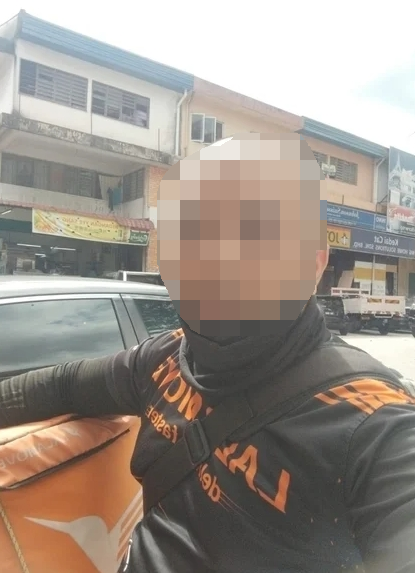
- Selfie
Example:
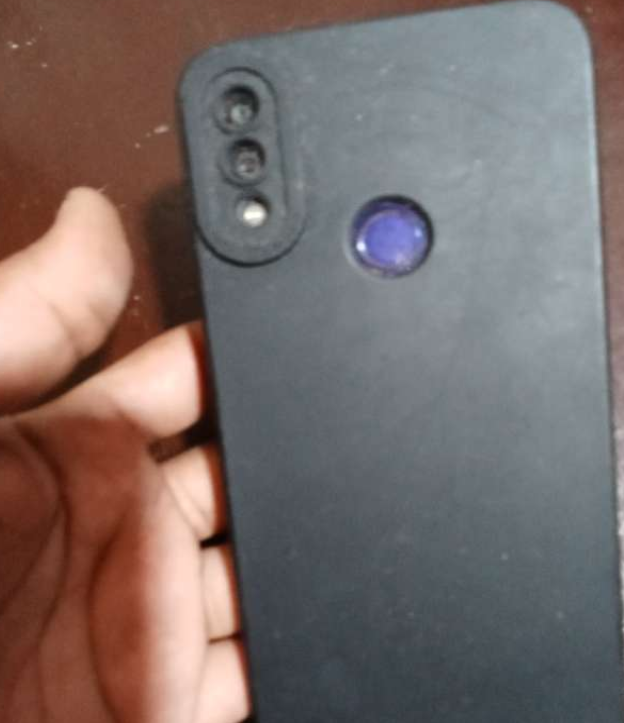
- Covering the camera / Blank screen
Example:


No. A valid Proof of Delivery (POD) photo is required to complete every delivery. Signatures are not accepted as proof of delivery. Ensure the photo clearly shows the package in its final, secure location and complies with Lalamove's Proof of Delivery requirements.
We require a Proof of Delivery photo for all deliveries. This helps protect both you and the customer in case of reports of lost or damaged items.
1. If you are delivering to a residential area, the photo should capture the recipient's apartment number.
2. If the apartment or unit number is not visible, and the building has an elevator, take the picture with the posted elevator document containing the building address.
3. If the elevator document does not contain the building address, or the building does not have an elevator, hold the item and take a picture with the customer’s door in the background.
4. If you are delivering to a non-residential area or any building where you cannot go further than the reception, take the picture with the identifiable logo (e.g hotel name) in the background.
5.Pictures that do not contain any clear indication of the drop-off location may not be useful for delivery confirmation.
To respect privacy, please avoid taking photos of customers, their faces, or the inside of their homes. Focus only on the item and the drop-off location.
Kindly follow a step-by-step guide to provide your proof of delivery on the Lalamove Application
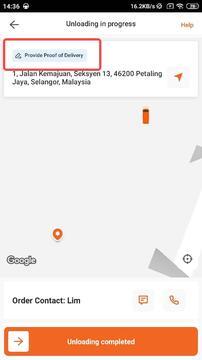
A small pop-up will appear on the top-right corner to indicate that you will need to submit proof of delivery upon order completion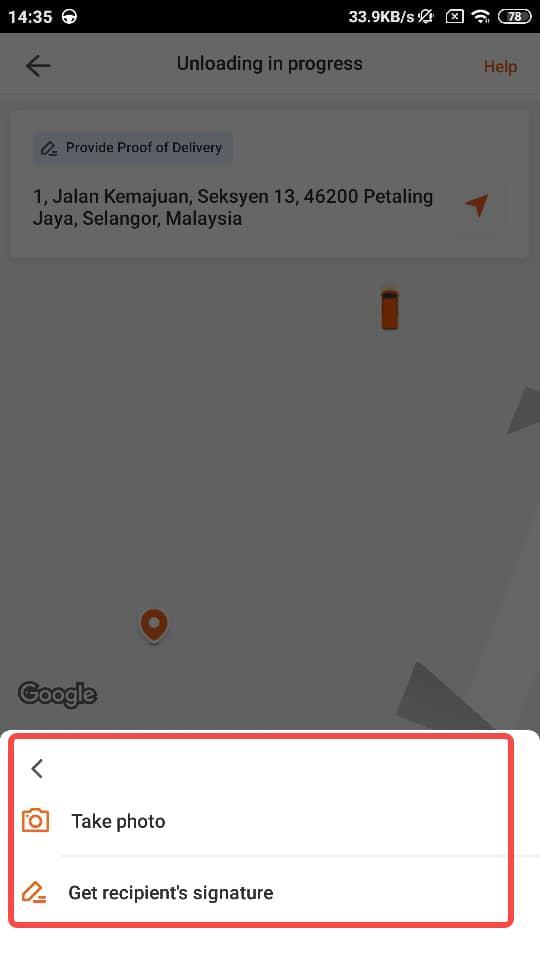
Click either the two options to upload your proof of delivery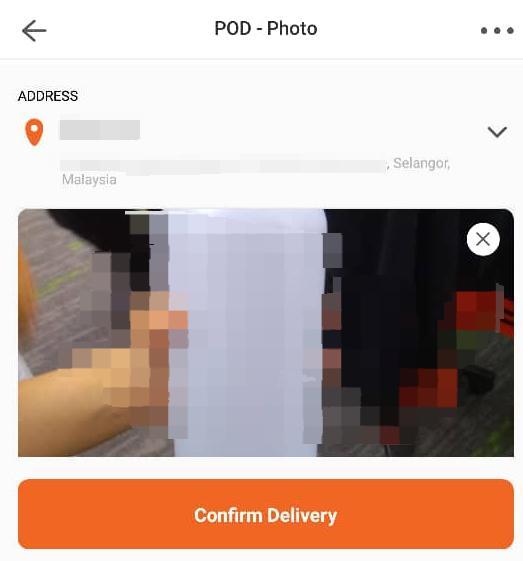
Upload your photo that you have taken from your camera
If you don’t see the option to upload a POD, it could be because the feature wasn't enabled by the customer when placing their order.
For users: If you'd like POD for your deliveries, make sure to enable the feature in your Settings.
Lalamove is a 24/7 on-demand delivery app that provides reliable, effective, and affordable delivery solutions. Through a dedicated mobile app, Lalamove seamlessly connects users and drivers across NYC to deliver faster!
We deliver across New York, as well as Northern and Central New Jersey. Stay tuned as we expand to new service areas!
Lalamove operates 24/7 to best serve your needs. We specialize in on-demand delivery and same day courier service by quickly matching you with nearby Driver Partners.
Use Lalamove to handle all your express and urgent deliveries, anytime of the day.
Open the app, tap the side navigation, and select "Help Center" to begin talking with customer service.
Follow these steps to place an order:
1. Enter the addresses for pick up and drop off
You may choose an immediate order or a scheduled order based on your needs
- Immediate order: The Driver Partner will pick up the delivery as soon as possible
- Scheduled order: You may select pick up time based on your preferred schedule up to 30 days in advance
If you need to add multiple stops, just click on the "+ Add Stop" button to add a stop. You may add up to 20 stops within the same order.
2. Select the vehicle type
Evaluate the size of your delivery, and select the vehicle type you need.
3. Add in any notes and confirm the booking
If there are any notes you want to provide to the Driver Partner, you can add it on the next page! Confirm the contact information and select your payment method. If you have a coupon and/or discount code, you may also add it there.
Once everything is good to go, just click on "Place Order" and we will match you with a Driver Partner.
Mobile App
To schedule an order, simply click on the "Pick-up Time" on the order placing page and select "Later". You will then be able to select the pick up time based on your preferred schedule up to 30 days in advance.
Simply click on the "+ Add Stop" button to add additional dropoff locations. You may add up to 20 locations in one order.
You may also drag and rearrange the sequence of the dropoff locations based on your needs!
If you have a favorite Driver Partner saved in your account, you may request your them to pick up your order first. However, if none of your favorite Driver Partners are online or available, your order may be picked up by another Driver Partner.
Mobile App
On the "Add More Details" page, turn on the "Favorite Drivers First" button and your order will be seen by your Favorite Driver Partner(s) first.
Web
Check the "Assign to favorite driver only" box in the "Notes to driver section" under the notes text field.
Once you are matched with a Driver Partner, you will be able to see their details. Your Driver Partner will also contact you via phone to confirm the order. Should you want to reach out to the Driver Partner again, you may also contact them via the app in the order details.
Mobile App
Underneath the driver details you may click on the "Chat" or "Call" button to use the in-app chat to chat with the driver or call the driver directly.
Web
You may chat with the driver directly. You may also refer to the driver's phone number listed in the Order Details panel and contact the driver via your phone.
Same as how to contact my driver.
Once an order has been successfully matched, you will be able to see an estimated arrival time on the map. Once the Driver Partner has picked up your delivery, the time listed will be the estimated arrival time to the drop off location.
Please note that the time listed is only for reference and may be changed due to unforeseeable reasons such as traffic and weather issues.
You will be able to check the location of the Driver Partner via the order page. You may see where your Driver Partner is in real time and get notified instantly when the delivery has been completed.
You can even send the tracking information to your customer by clicking the share button on the order page so they know the delivery status and the estimated time of arrival.
Each status shows the status for the delivery in real-time. Some of the statuses that may appear on your order are:
On the mobile app
Finding a Driver --> We are currently finding a driver for your order
Awaiting Driver --> Your order has been matched with a driver and they're heading to the pick up location
In transit --> The driver has arrived at the pick up point
Delivering --> The driver has arrived at the drop off point
Confirming Bill --> Driver has finished unloading and is confirming the final bill
Settle Bill --> The driver has sent the final bill
Completed --> The delivery has been completed and payment has been settled
Cancelled --> Your order is cancelled
On the web app
Matching --> We are currently matching a driver for your order
Ongoing --> Your order has been matched with a driver and the driver is heading to pick up point
Picked Up --> The driver has picked up the item and is heading to the drop off point
Confirming Bill --> Driver has finished unloading and is confirming the final bill
Settle Bill --> The driver has sent the final bill and is pending the payment from customer
Completed --> The delivery has been completed and payment has been settled
Cancelled --> Your order is cancelled
You may share the order with the recipient from the order page.
Mobile App
Simply click on the "Share" button on the order page and the recipient may receive real time tracking of the delivery.
Web
Simply click on the "Track Order" button on the order page and the recipient may receive real time tracking of the delivery.
We care about your delivery experience, after the order has been completed, you will be prompted to rate the driver. If you would like to rate driver at a later time, simply just go back to the order details page on the app or the order details panel on the website.
If you would like to rate driver at a later time, simply just go back to the order details page on the app or the order details panel on the website and click on the pencil icon next to the rating.
Simply go to "Settings" and enable the "Enable Digital Signature" button. Once enabled, the delivery would require the recipient to sign after receipt.
There is no maximum number of orders per day! You may place as many order as you want everyday!
If you would like to check on the photos uploaded by the driver, click on the order details page on the app or the order details panel on the website. You will be able to see picture uploaded under the Drop Off location.
To edit an order, tap the icon in the top-right corner of the order page and select “Edit order” from the menu in the app, or click the edit icon under the route section on the web.
You may edit the drop-off location, recipient details, and notes to the driver. Price changes may apply based on location updates. Please note that you are only allowed to edit an order once.
To change the driver, tap the icon in the top-right corner of the order page in the app, or use the option under the driver card on the web, and select “Find a new driver”. Once unassigned, your order will be made available for other drivers to accept.
Please note that you can only unassign the driver once per order.
For orders that have not yet been matched with a driver, you may cancel at any time by clicking “Cancel Order” on the order page—located in the top-right corner on the app (bottom-right corner on the website).
For immediate orders that have already been matched with a driver, you may cancel your order up to 15 minutes after the match.
For scheduled orders, you may cancel up to 45 minutes before the scheduled pick-up time once it has been matched.
If you wish to cancel the order after the 15 minutes period, please contact our Customer Service Team. Cancellation fees may apply.
You can only cancel your order within the designated grace period. If you need to cancel after this period, please contact our Customer Service Team for assistance. Cancellation fees may apply.
Grace period:
Immediate Orders: Within 15 minutes after being matched with a driver.
Scheduled Orders: Up to 45 minutes before the scheduled pick-up time.
You can only edit your order before the driver arrives at the pick-up location. If you need to make changes after this point, please contact our Customer Service Team for assistance.
Additional services are not always available for all vehicle types. When selecting your vehicle, you will be able to see which additional services you can request and the associated costs.
Each order’s fee is calculated based on your specific requirements, such as the vehicle type, add-on services, and the distance between the pick-up and drop-off locations.
You can find detailed pricing information here.
You may select your payment method on the order confirmation page. Currently, we only accept cash and card payments.
You can select your preferred payment method on the payment page when placing an order. Simply choose the card you would like to use. You may change the payment method for each order according to your preference.
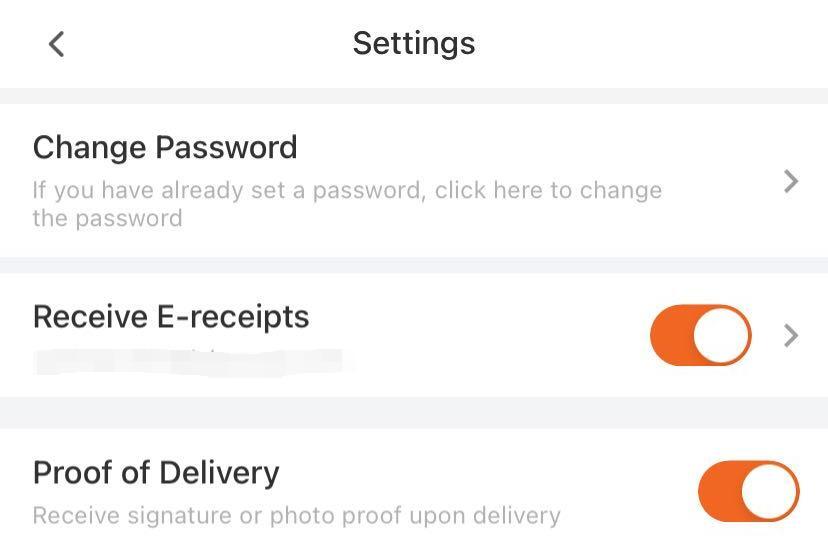
Enable the “Receive E-receipts” function under your settings page to receive e-receipts for each order. Please enter your email address to opt in.
To obtain an e-receipt for a specific order, click “Get Receipt” at the bottom of the order details page. You can choose to resend the receipt or download it as a PDF.
To retrieve an e-receipt for a specific order, click “Get Receipt” at the bottom of the order details page. You can resend the receipt or download the PDF from there.
If you still do not receive the receipt, please contact our Customer Service Team for further assistance.
You can add a coupon on the payment page by entering the coupon code in the “Add coupon” section. Once the coupon is applied, the corresponding amount will be deducted from your order.
Alternatively, you can add a coupon for future use by going to the “Wallet” page, selecting “Coupons,” and adding your coupon there. You can also view all your available coupons on this page.
We are sorry that we may not be able to find you a Driver Partner, it could be due to no Driver Partners available around your area or all Driver Partners are busy with other orders.
Try adding in a priority fee to encourage Driver Partners to pick up your order earlier.
If you are unable to find your address while searching for it, you may click on the "Wrong or missing location?" button to report on the missing location. Our team will review and make take the necessary actions to fix this.
If you face any unforeseen issues with the ongoing delivery and unable to settle with the Driver Partner, please talk to our Customer Service Team.
If your order is still not completed, please contact the Driver Partner first and ask for an update on the delivery status. If you are unable to contact the Driver Partner, or there are other issues, you may contact our Customer Service Team.
We are sorry that your experience on our platform did not meet your expectation. Please contact our Customer Service Team for further assistance.
Driver Partners may deviate from the suggested route if there are unforeseen traffic situations. If you suspect that the Driver Partner is not heading towards the drop off point, please contact the Driver Partner to reconfirm. Should you require further assistance, please reach out to our Customer Service Team.
You may contact the Driver Partner via the in-app feature or by a phone call.
If your Driver Partner is unresponsive and you would want to change the Driver Partner, you may click on the icon on the top right corner of the order page and click "Find a new driver". Once unassigned, your order will be made available for other Driver Partners to deliver.
The charge noted in the bill of the order page shall be the charge to be paid. If there are any additional charges that were not agreed by both parties, please contact our Customer Service Team for further assistance.
Driver Partners usually contact recipient upon arrival to confirm drop-off, please pay attention to calls when Driver Partner is near.
If the Driver Partner is unable to drop-off, please contact them to provide next steps. Should you need additional assistance, please contact our Customer Service Team.
If you have forgotten your password, click on the "Forgot password" button and input your phone number on your registered account. We will then send you a SMS or a call for you to verify and update your password.
To change your password, go to Settings and click "Change Password". Follow the steps according to the prompts.
To update your phone number, click on your profile picture at the top left. Under your profile settings, you will be able to change your phone number after verification.
For Android, you may turn on/off in the device settings page
For iOS, you may turn on/off in App settings page
However, we high recommend that you keep the notification open so you don't miss out on any updates on your orders or any promotions we may have.
To sign up, simply click on the "Don't have an account?" button at the sign in page and you may register an account with your mobile number.
Alternatively, you may also register an account with your Facebook, Google or Apple account by simplying clicking the icon on the login page. You will then be directed to the registration page.
Kindly reach out to our Live Chat agent for further assistance.
Unfortunately, We do not deliver passengers or pets. We do not deliver chemicals, unsecured flammable objects, or items which could endanger the safety and well-being of our Driver Partners. Please get in touch with us should you have any questions about whether the items you wish to deliver are allowed.
Otherwise, we deliver almost everything else!
The size limit varies depending on the vehicle type you chose!
Please refer to the below for the size and weight limitation
- Reduce operational costs: Without your own fleet of vehicles and team of drivers, you get to save on the vehicle purchasing cost, the vehicle maintenance fees, and overheads that come with employing drivers on a full- or part-time basis.
- Save even more with multi-stop at up to 20 different locations within one trip!
Open the app, tap the side navigation, and select "Help Center" to begin talking with customer service.